User manual - SBB™ MKII Series v1.2
 | SBB™ MKII Series | User Manual v1.2 |
| ⤵️To download this user manual in pdf format, please click here. | ||
1. DOCUMENT SCOPE
1.1 Applicable products
This user manual contains information specific to the BlueNova SBB™ (Single Box Battery) MKII Series. At the time of publication of this manual, the SBB™ MKII Series consisted of only one product, namely SBB™ MKII BN52V-314-16k.
If you are unsure whether the information in this document is applicable to your specific product, please contact BlueNova’s Technical Support department for confirmation before proceeding with carrying out any guidelines and/or instructions contained herein.
1.2 Target audience
This document has been compiled to provide supportive information predominantly to energy industry professionals tasked with installation and/or technical maintenance of SBB™ MKII Single Box Batteries. Such individuals should be:
- adequately trained and experienced in the installation and maintenance of electrical DC systems.
- capable of interpreting electrical circuit diagrams.
- familiar with the composition and basic operating principles of multi-product energy storage systems.
- aware of and compliant to the industry safety standards of the associated country / region.
This document also contains information of a more general nature which might be of use to any one or more individuals involved with the basic day-to-day operation, transportation, storage and/or disposal of SBB™ MKII Single Box Batteries, as well as those needing to act in the interest of occupational health & safety under associated circumstances.
1.3 Symbols
The table below lists the various symbols used throughout this manual alongside the meaning of each:
Symbol | Meaning | Description |
| ℹ️ | NOTICE | Indicates supplementary information relevant to the chapter / section. Taking note of this information may provide further insight into the topic at hand. |
| ⚠️ | WARNING | Indicates information that is of critical importance to product/system functionality. Failure to adhere to these instructions may lead to product/system malfunction and/or damage. |
| ‼️ | DANGER! | Indicates information that is of critical importance to product/system functionality and personal safety. Failure to adhere to these instructions may lead to product/system malfunction and/or damage, serious personal injury or even death. |
1.4 Terminology
The table below lists some of the product- and system-specific terms & abbreviations used throughout this manual:
Abbr. | Meaning | Description |
| BMS | Battery management system | A battery-integrated electronic system used to facilitate balanced charging, autonomous protective countermeasures & other functions. |
| EMS | Energy management system | An energy system-integrated solution used to facilitate serial communication, remote monitoring & other system control measures. |
| ESS | Energy storage system | An electrical system which includes one or more batteries. |
| PCS | Power conversion system | A bi-directional inverter used in energy storage systems. |
| PPE | Personal protective equipment | Equipment worn by operators to minimise the risk of personal injury. |
| SBB™ MKII | Single Box Battery Mark II | The product/-range covered in this document. |
Additionally, the table below lists some of the industry-specific terms & abbreviations used throughout this manual:
Abbr. | Meaning / description |
| A | Ampere. The unit of measurement of electrical current. |
| AC | Alternating current. Electrical current that changes direction several times per second, such as supplied by utility grids, inverter output to loads & other devices. In compatible with batteries directly. |
| Ah | Ampere-hour. The unit of measurement of cell capacity. Battery capacity is not specified in Ah as a rule, but instead in Wh / kWh / MWh. |
| C(n) | Battery rate of charge and/or discharge (where n = the number of hours required to hypothetically recharge the battery in question from 0-100% SoC at constant current). |
| CAN | Controller Area Network. A widely used serial communication protocol. |
| DC | Direct current. Electrical current that flows in one direction only, such as supplied by batteries and solar PV panels/-arrays. |
| EoL | End-of-life. The point at which a battery reaches a predetermined number of cycles. Normally specified alongside the minimum capacity retained at this point. |
| FW | Firmware. Specialised software normally installed directly onto one or more hardware-integrated ROM modules for the purposes of establishing functionality in the hardware. |
| HVAC | Heating, ventilation & air conditioning. In energy storage systems, this refers to the peripheral hardware and/or integrated subsystem(s) used for system temperature regulation. |
| IP(xy) | Ingress protection rating. Indicates how well an electrical device’s enclosure protects the device from contamination by foreign matter (where x = numerical rating for solids, and y = for liquids). |
| kWh | Kilowatt-hour. The unit of measurement of energy (and by extension, also battery capacity). |
| LiFePO4 | Lithium iron phosphate. Part of the lithium-ion family of battery chemistries. Unlike almost all other lithium battery chemistries, LiFePO4 (sometimes also: LFP) is inherently safe. |
| Ω | Ohm. The unit of measurement of electrical resistance. |
| RS485 | Recommended Standard #485. A serial communication protocol standard for multi-node systems. |
| SoC | Battery state of charge. Expressed as a percentage. |
| SoH | Battery state of health. Expressed as a percentage of the maximum remaining usable capacity in comparison to the original capacity of a battery. |
| V | Voltage. The unit of measurement of an electrical source’s potential to deliver energy. |
| VAC | The voltage of an electrical source with alternating current. |
| VDC | The voltage of an electrical component/source with direct current. |
| Wh | Watt-hour. The unit of measurement of energy (and by extension, also battery capacity). |
2. SAFETY REQUIREMENTS
2.1 Safety introduction
‼️ IMPORTANT: Due to the inherently high risks associated with live electrical systems, the information included in this chapter should be regarded as of critical importance. Failure to adhere to any of the safety requirements included in this chapter may lead to damaged products/components, voiding of associated product warranties (where applicable), damage and/or destruction of assets in proximity to such systems, electrical shock, serious injury and even death.
2.2 General safety requirements
The following non-exhaustive list of safety requirements are applicable to electrical systems in general:
‼️Electrical devices & components (incl. SBB™ MKII batteries) should always be installed, uninstalled, operated and/or serviced by suitably qualified personnel only.
‼️Always wear appropriate PPE and use tools & equipment of the correct type and condition when installing, uninstalling, operating, servicing, transporting and/or otherwise handling electrical equipment.
‼️Electrical connections between any two or more stand-alone electrical components/devices in an electrical system should include some slack. High tension connections between such components/devices may lead to deterioration of connection integrity over time, increase the risk of heat build-up and lead to thermal events.
‼️Do not use water or other electrically conductive fluids to clean electrical device enclosures and/or any other surface(s) in close direct contact with connected components in an electrical system.
‼️Electrically conductive accessories and/or jewellery should be removed before commencing with installation, uninstallation and/or maintenance of electrical systems, components or devices.
⚠️Before connecting any wires, cables or components in any electrical system which includes one or more live energy sources, measure the voltage between the relevant connector(s) and intended connection point(s) first. Do not proceed with any such connections if the measured voltage may damage connecting surfaces.
⚠️Air inlets and/or outlets of electrical device enclosures should remain free from obstruction. Obstructed air inlets/outlets may lead to insufficient heat dissipation and cause additional side effects incl. malfunction, damage and/or failure of such devices, thermal events & additional damage to peripheral assets.
2.3 Battery safety requirements
The following list of safety requirements are applicable specifically to SBB™ MKII Series batteries:
‼️Avoid direct contact with non-isolated conductive surfaces & potentially live connection points (i.e. battery terminals) in an electrical system. Do not install, service or otherwise directly interact with batteries, battery-connected circuitry & components without wearing the required PPE or using the appropriate tools.
‼️Batteries must be isolated (i.e. switched off and disconnected from all peripheral components) before being installed, serviced, repaired, uninstalled or relocated for any purpose at any given time.
‼️Do not short-circuit the positive and negative electrodes of individual battery cells, batteries or multi-battery configurations. Voltage may remain present over any two or more such electrodes even when the associated batteries/cells are disconnected from the associated electrical system and switched off.
‼️All conductive wiring & connection points in battery-integrated systems should be electrically insulated to the fullest extent possible. Do not install batteries in systems where any of the conductive wiring and/or connection points are not sufficiently insulated.
‼️Take care when transporting, unboxing, relocating and/or otherwise moving SBB™ MKII Series batteries. SBB™ MKII Series batteries weigh ±140kg each and may cause serious injuries if not handled correctly.
⚠️Before commencing with the installation of one or more SBB™ MKII Series batteries, each battery should be earthed first. Conversely, when uninstalling SBB™ MKII Series batteries, the earthing connection to each battery should be left intact (connected) until all other connections to each battery have been disconnected.
⚠️(Re)connecting & powering on the various components connected to any electrical system in which one or more SBB™ MKII Series batteries have been (re)installed should be done in strict accordance with the associated procedure(s) included in this document.
⚠️Do not store, install, service or repair batteries in locations where ambient factors such as temperature, humidity, etc. exceed (or will likely exceed in the foreseeable future) the acceptable range associated with each, as specified on the product datasheet.
⚠️Do not connect SBB™ MKII Series batteries to AC power sources directly. Do not connect SBB™ MKII Series batteries to non-compatible DC power sources directly. Do not connect SBB™ MKII batteries in series.
⚠️Do not connect batteries to PV panels or -configurations directly. Always install the appropriate fusing & compatible supplier pre-approved MPPT module(s) between batteries and PV panel configurations.
⚠️SBB™ MKII Series batteries of which any integrated LiFePO4 cell(s) exhibit expansion/bulging should be discontinued from use immediately and repaired/replaced as necessary.
⚠️SBB™ MKII Series batteries stored for extended periods should be recharged at least once every 3 months. In such cases, a calibrated product-compatible inverter/charger should be used to recharge each battery individually to 40–60% SoC in accordance with the relevant procedure(s) contained in this document.
3. PRODUCT OVERVIEW
3.1 Product applications
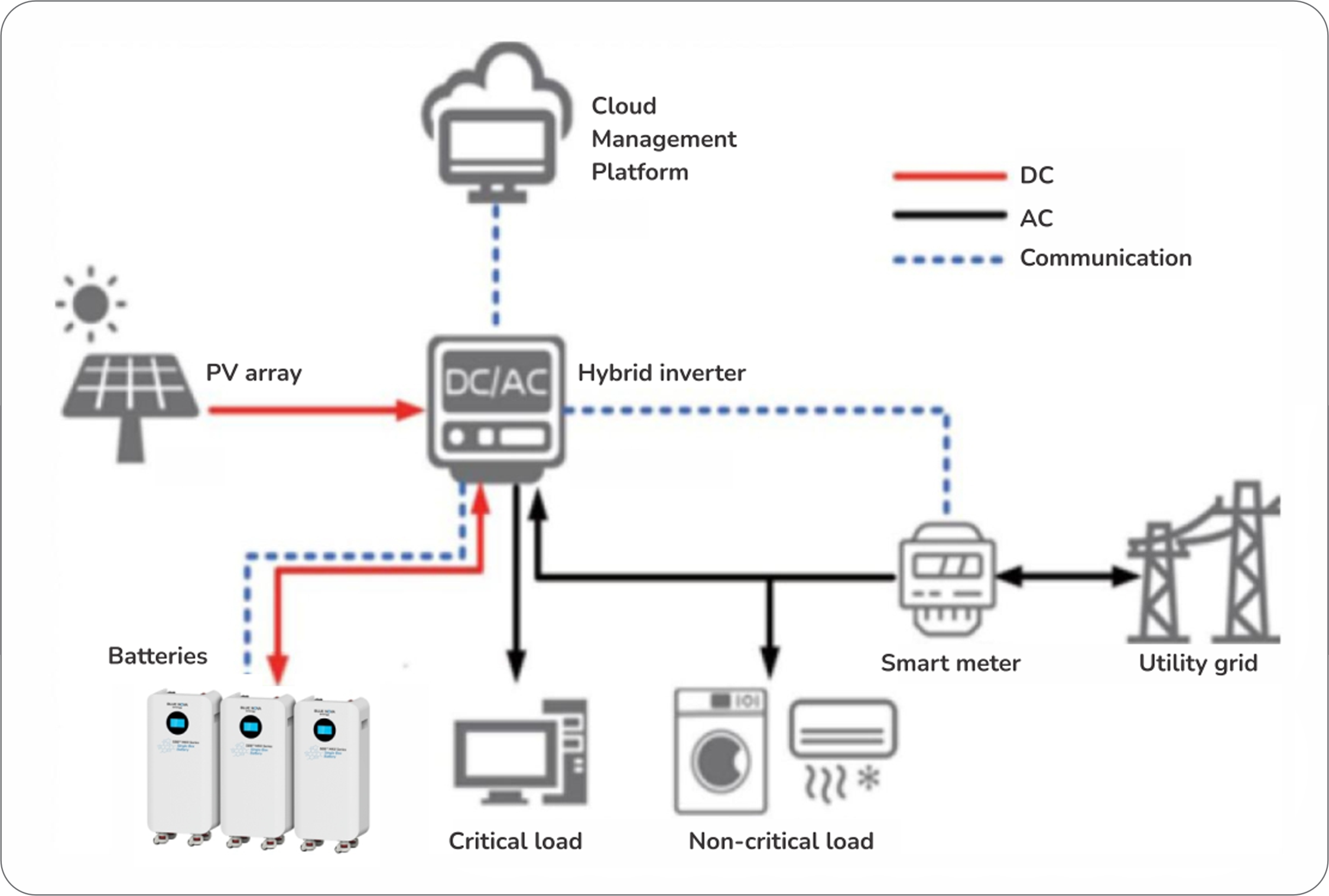
SBB™ MKII Series batteries can be used to provide backup power, load shifting and peak shaving in residential and small commercial applications. The diagram below illustrates the general operational capability of a typical SBB™ MKII Series battery installation:
3.2 Summary of features
SBB™ MKII Series batteries include the following functions & features:
- High performance BMS: Ensures that the cells in each SBB™ MKII battery are balanced during charge cycles and includes autonomous protective measures against adverse operating conditions.
- Alarms: Triggered upon detection of operating conditions such as over-voltage, under-voltage, over-current, short circuit connections, temperature out-of-range, electronic component failure & battery failure.
- Serial communication: Includes serial communication (RS485 / CAN) integration capability with compatible peripheral devices. Supports uploading of measured health & performance data to select monitoring platforms.
- Parallel configuration: Up to 15 × SBB™ MKII batteries can be interconnected in parallel per system.
3.3 Component layout
The diagram below illustrates the dimensions and external component layout of an SBB™ MKII Series battery:
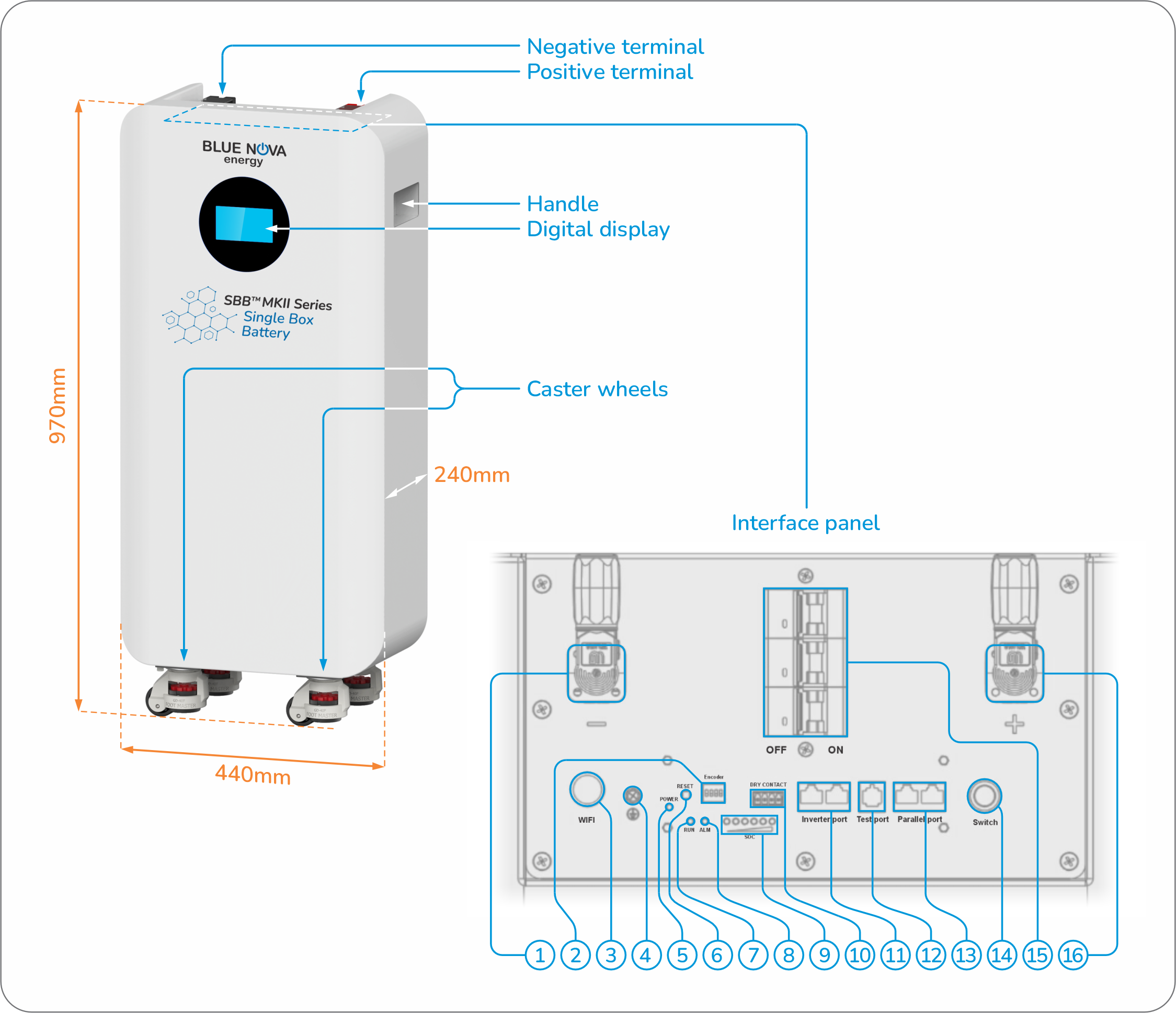
The 16 x numbered components on the interface panel inthe diagram above are described in the table below:
# | Label | Type | Description |
| 1 | - | Terminal | The negative terminal of the battery. |
| 2 | Encoder | DIP switch array | Used to define the address of a specific battery in an interconnected parallel battery configuration. |
| 3 | WiFi | LED | Indicates the connection status of the battery to a compatible Bluetooth™️ access point within range. |
| 4 | ⏚ | Connection point | Indicates the connection point from which the battery’s enclosure should be connected to an electrical earthing point. |
| 5 | POWER | LED | Indicates whether the battery is switched on or off. |
| 6 | RESET | Push button | Press this button to reboot the battery. |
| 7 | RUN | LED | Indicates the operational status of the battery (see 3.3.1 below). |
| 8 | ALM | Button | Indicates whether the battery is in alarm status (see 3.3.1 below). |
| 9 | SOC | LED array | Indicates the state-of-charge of the battery (see 3.3.1 below). |
| 10 | DRY CONTACT | Connection point array | Used for testing purposes. |
| 11 | Inverter port | 2 x RJ45 ports | Used to connect the serial communication (CAN/RS485) of the battery/parallel battery configuration to a compatible inverter. |
| 12 | Test port | RJ11 port | Used for debugging purposes. Do not connect devices to this port. |
| 13 | Parallel port | 2 x RJ45 ports | Used to establish serial communication between batteries interconnected in a parallel battery configuration. |
| 14 | Switch | Push button | Press this button to switch the battery on. Keep this button depressed for a few seconds to shut the battery down. |
| 15 | OFF ON | 3 x breakers | Safety feature. Automatically opens to disconnect the associated battery whenever out-of-range operation is detected. |
| 16 | + | Terminal | The positive terminal of the battery. |
3.4 Technical specifications
The tables below list the technical specifications of SBB™ MKII Series batteries:
General product specifications | |
| Cell chemistry & configuration | Lithium iron phosphate (LiFePO4) { 16S1P |
| Cell specifications | V(nom) = 3.2V | Capacity = 314Ah @C2, 25°C |
| Battery voltage | 51.2V nominal |
| Battery (energy) capacity | Total installed capacity @100% DoD = 16 077Wh; Usable capacity @recommended max. 80% DoD = 12 861Wh |
| Multi-unit configuration range | 1S1P ~ 1S15P units (16 ~ 241kWh per system) |
| Communication | CAN; RS485; Bluetooth |
| User interface | Integrated 4.3” touch-screen display |
| Dimensions (unboxed) | 440 × 240 × 970mm (W × D × H) |
| Net weight (unboxed) | ±140kg |
Voltage, current & cycle life specifications | |
| Operating voltage range | 43.2 ~ 57.6VDC |
| Max. charge current | Continuous: 150A | Peak: 160A (for ≤60 seconds) |
| Max. discharge current | Continuous: 200A | Peak: 210A (for ≤60 seconds) |
| Cycle life | ≥8000 cycles @80% DoD, C2, 25°C |
Environmental & safety specifications | |
| Ambient temperature range | Charge: 0°C ~ 50°C | Discharge: -20°C ~ 50°C |
| Ambient humidity range | 0 ~ 95% relative humidity (non-condensing) |
| Ingress protection rating | IP20 (for indoor use only) |
| Certifications | CE-EMC; UN38.3; MSDS; IEC62619 |
ℹ️While the above specifications are guaranteed to be correct at the time of publication of this user manual, BlueNova products remain subject to continued improvement where possible. Any information associated with such changes therefore remain subject to change and will be published in the relevant datasheet first.
4. PRE-INSTALLATION
4.1 Packing list
The following components are included with each newly ordered SBB™ MKII Series battery shipped:
Item no. | Item name | Qty | Notes |
| 1 | SBB™ MKII Series battery | 1 | Main component. |
| 2 | Positive terminal power cable | 1 | Red cable fitted with a terminal connector lug. |
| 3 | Negative terminal power cable | 1 | Black cable fitted with a terminal connector lug. |
| 4 | Serial communication cable | 1 | Fitted with 1 x RJ45 connector on each end. |
| 5 | Ground / earthing cable | 1 | Fitted with a connector lug. |
ℹ️Upon unboxing a newly purchased SBB™ MKII Series battery, verify that each of the above components are included within the battery's packaging as well as undamaged. Should any of the above components not be included in any such shipment, please contact BlueNova Technical Support before proceeding with installation.
4.2 PPE & tools
The various PPE & tools which may be required to successfully install SBB™ MKII Series batteries are listed below:
| Safety boots | Anti-static gloves | Safety goggles | Hard hat |
| Calibrated multimeter | Screwdriver set | Torque wrench & sockets | Insulation tape |
| Forklift / pallet jack | Foldable ladder | Measuring tape | Levelling instrument |
4.3 Site requirements
The following site requirements must be met before proceeding with the installation of SBB™ MKII Series batteries:
- The allocated site/area/building should be free from flammable and/or explosive materials in proximity.
- The surface on which SBB™ MKII Series batteries are due to be installed must be solid & level.
- SBB™ MKII Series batteries should not be installed near heat sources or in areas exposed to direct sunlight.
- The site/area/building should be protected against water leakage & excess ingress of other foreign materials.
- The appropriate measures should be taken to ensure that the temperature & humidity at the site/area/building remain within acceptable levels in accordance with product datasheet specifications.
- The allocated site/area/building should include sufficient ventilation.
- SBB™ MKII Series batteries should only be installed in locations where they will remain accessible to relevant technical personnel if/when necessary – especially in cases of emergency.
- The allocated site/area/building should include all the required industry-standard safety signage & equipment (fire extinguishers etc.) associated with electrical installations.
5. INSTALLATION
5.1 Installation - Single battery
The diagram and corresponding instructions below describe the procedure for installing a single SBB™ MKII battery:
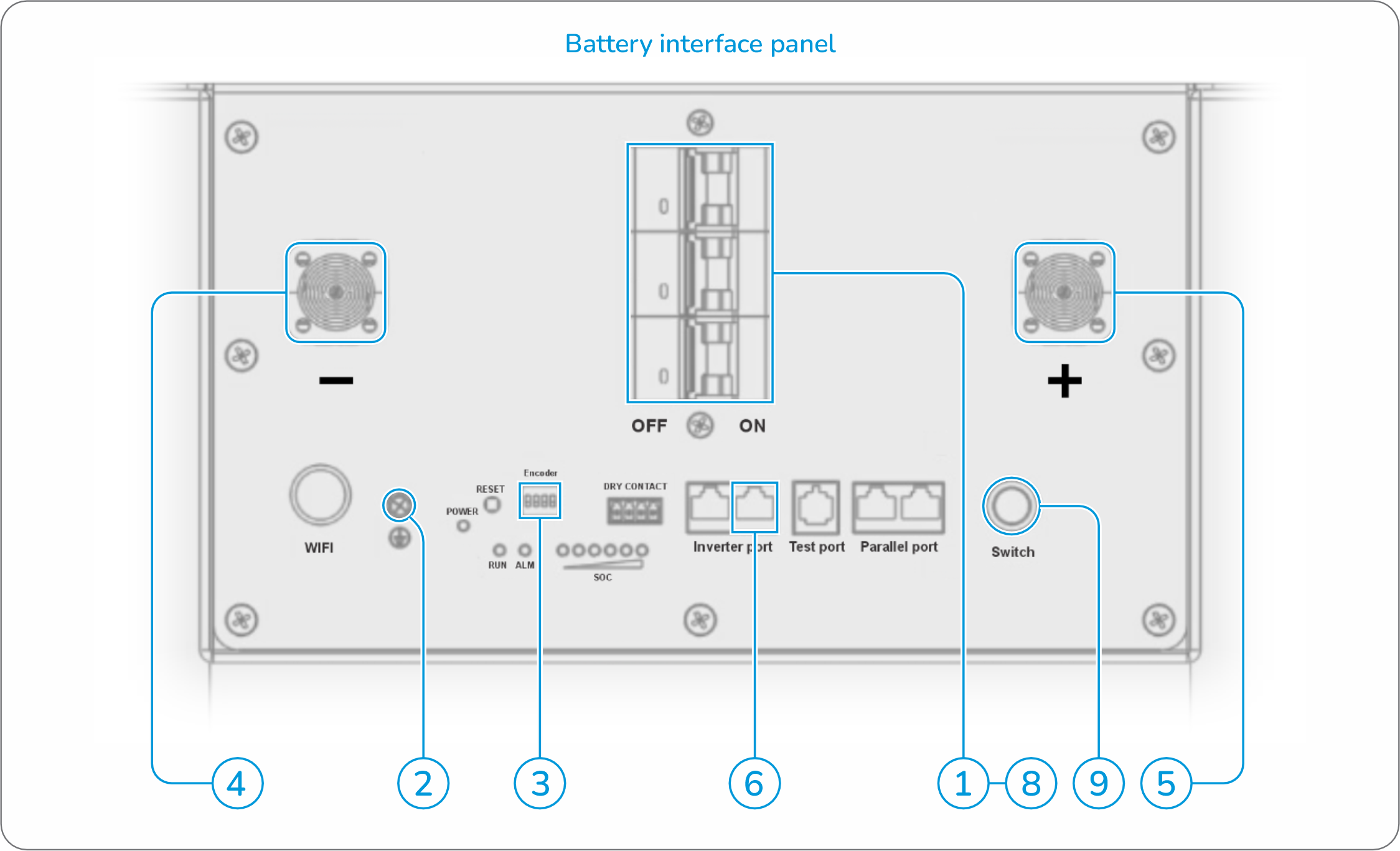
Step-by-step instructions:
- Ensure that the battery-integrated breaker switches (and the inverter/charger to connect to) are switched off.
- Connect the battery’s enclosure to an electrical earthing point.
- Set the switches on the DIP switch array to [ ON | OFF | OFF | OFF ] (see section 5.3 for more information).
- Connect the battery’s negative terminal to the appropriate negative terminal of the system’s inverter/charger.
- Connect the battery’s positive terminal to the appropriate positive terminal of the system’s inverter/charger.
- Connect the battery’s second RJ45 “Inverter port” to the appropriate serial communication port of the system’s inverter/charger. See section 5.4 for more information on RJ45 connector pinout configuration.
- Switch the inverter/charger on (not illustrated in the diagram above).
- Switch battery-integrated breakers on.
- Switch the battery on by pressing the indicated button.
5.2 Installation - Parallel batteries
The diagram and corresponding instructions below describe the procedure for installing SBB™ MKII batteries in parallel.
ℹ️Note: A maximum of 15 × SBB™ MKII Series batteries can be installed in parallel per system:
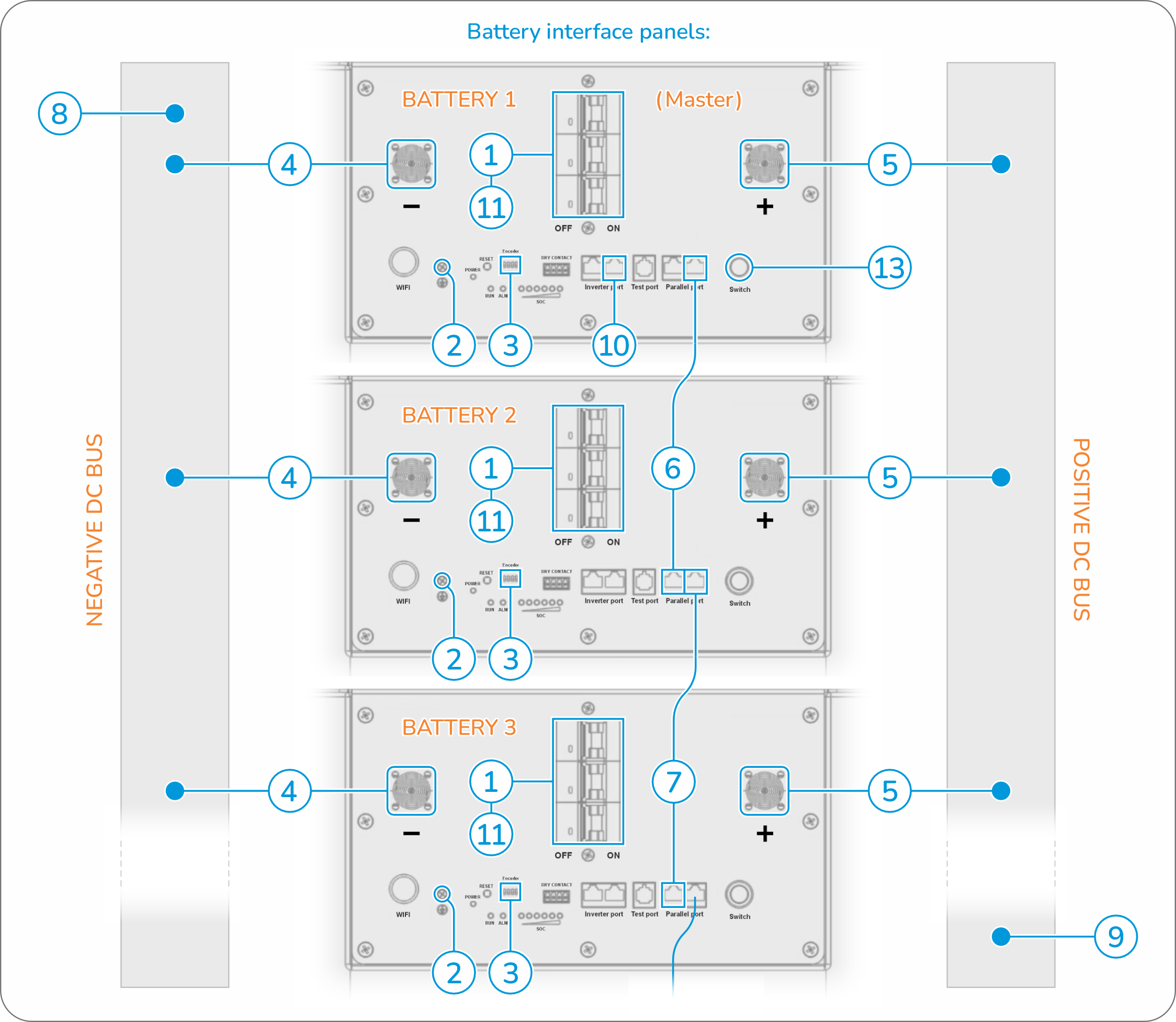
Step-by-step instructions:
- Ensure that each battery’s integrated breaker switches (and the inverter/charger to connect to) are switched off.
- Connect each battery’s enclosure to an electrical earthing point.
- Set the switches of the DIP switch array on each battery according to the instructions included in section 5.3 of this user manual.
- Connect the negative terminal of each battery to a common negative DC bus bar. Each cable used for this purpose should be of the same length, diameter, conductive material and quality.
- Connect the positive terminal of each battery to a common positive DC bus bar. Each cable used for this purpose should be of the same length, diameter, conductive material and quality.
- Connect the second RJ45 “Parallel port” of battery 1 (master) to the first RJ45 “Parallel port” of battery 2 with an appropriate RJ45 cable. See section 5.4 for more information on RJ45 pinout configuration.
- Connect the second RJ45 “Parallel port” of battery 2 to the first RJ45 “Parallel port” of battery 3 with an appropriate RJ45 cable. Continue this process until the serial communication of all batteries included in the parallel configuration are interconnected. See section 5.4 for more information on RJ45 pinout configuration.
- Connect the negative DC bus bar to the appropriate negative terminal on the system’s inverter/charger.
- Connect the positive DC bus bar to the appropriate positive terminal on the system’s inverter/charger.
- Connect the master battery’s second RJ45 “Inverter port” to the appropriate serial communication port of the system’s inverter/charger. See section 5.4 for more information on RJ45 pinout configuration.
- Switch each battery’s integrated breakers on.
- Switch the system’s inverter/charger on (not illustrated in the diagram above).
- Switch the first (master) battery on by pressing the indicated button. The rest of the interconnected batteries in the configuration should then switch on automatically.
⚠️Parallel battery configurations should always be connected to the associated system’s inverter / charger from end-to-end, i.e. from the positive terminal of the first battery (or closest point thereto on a common positive DC bus bar) and the negative terminal of the last battery (or closest point thereto on a common negative DC bus bar) of the entire parallel configuration, or vice versa.
5.3 DIP switch array
The DIP switch array included on the interface of each SBB™ MKII Series battery is labelled with the text “Encoder” and includes 4 × DIP switches. The switch array is used to define the number of batteries connected to a specific system as well as the specific address of each individual battery included in parallel battery configurations (where applicable):
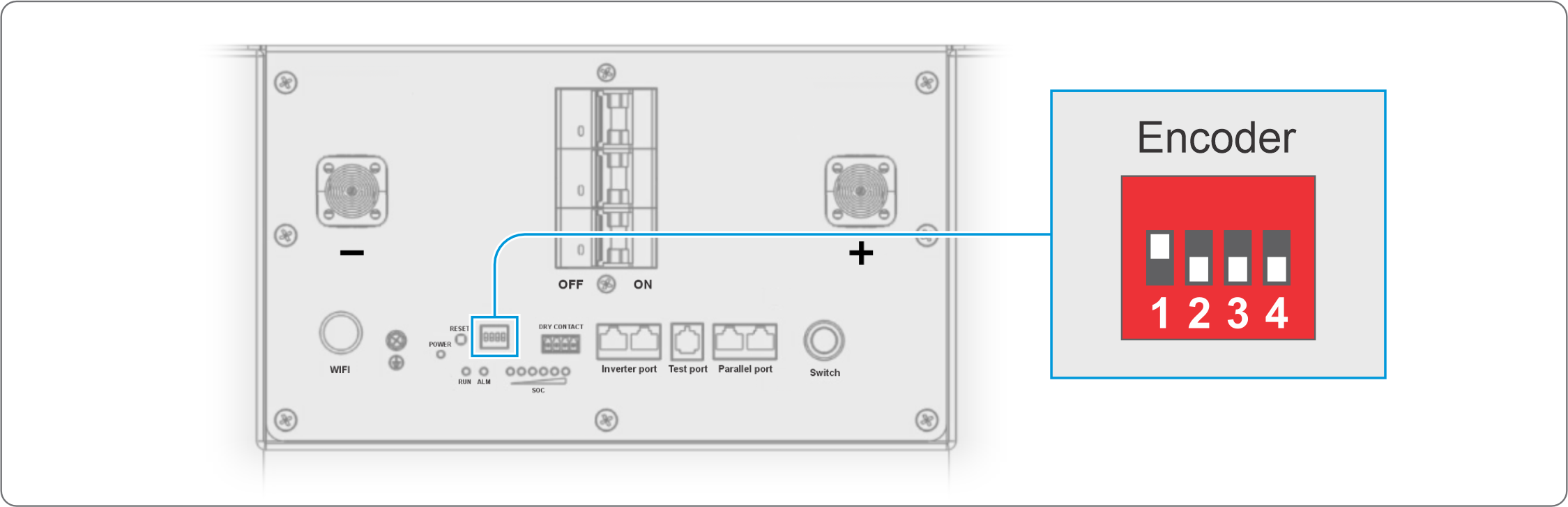
The DIP switch array configuration for both single and parallel-connected battery configurations are detailed in the table below:
Battery number | Battery designation | DIP switch array configuration | |||
#1 | #2 | #3 | #4 | ||
| Battery #1 | Master / single battery | ⬆️ON | 🔻OFF | 🔻OFF | 🔻OFF |
| Battery #2 | Slave battery #1 | 🔻OFF | ⬆️ON | 🔻OFF | 🔻OFF |
| Battery #3 | Slave battery #2 | ⬆️ON | ⬆️ON | 🔻OFF | 🔻OFF |
| Battery #4 | Slave battery #3 | 🔻OFF | 🔻OFF | ⬆️ON | 🔻OFF |
| Battery #5 | Slave battery #4 | ⬆️ON | 🔻OFF | ⬆️ON | 🔻OFF |
| Battery #6 | Slave battery #5 | 🔻OFF | ⬆️ON | ⬆️ON | 🔻OFF |
| Battery #7 | Slave battery #6 | ⬆️ON | ⬆️ON | ⬆️ON | 🔻OFF |
| Battery #8 | Slave battery #7 | 🔻OFF | 🔻OFF | 🔻OFF | ⬆️ON |
| Battery #9 | Slave battery #8 | ⬆️ON | 🔻OFF | 🔻OFF | ⬆️ON |
| Battery #10 | Slave battery #9 | 🔻OFF | ⬆️ON | 🔻OFF | ⬆️ON |
| Battery #11 | Slave battery #10 | ⬆️ON | ⬆️ON | 🔻OFF | ⬆️ON |
| Battery #12 | Slave battery #11 | 🔻OFF | 🔻OFF | ⬆️ON | ⬆️ON |
| Battery #13 | Slave battery #12 | ⬆️ON | 🔻OFF | ⬆️ON | ⬆️ON |
| Battery #14 | Slave battery #13 | 🔻OFF | ⬆️ON | ⬆️ON | ⬆️ON |
| Battery #15 | Slave battery #14 | ⬆️ON | ⬆️ON | ⬆️ON | ⬆️ON |
5.4 Serial communication
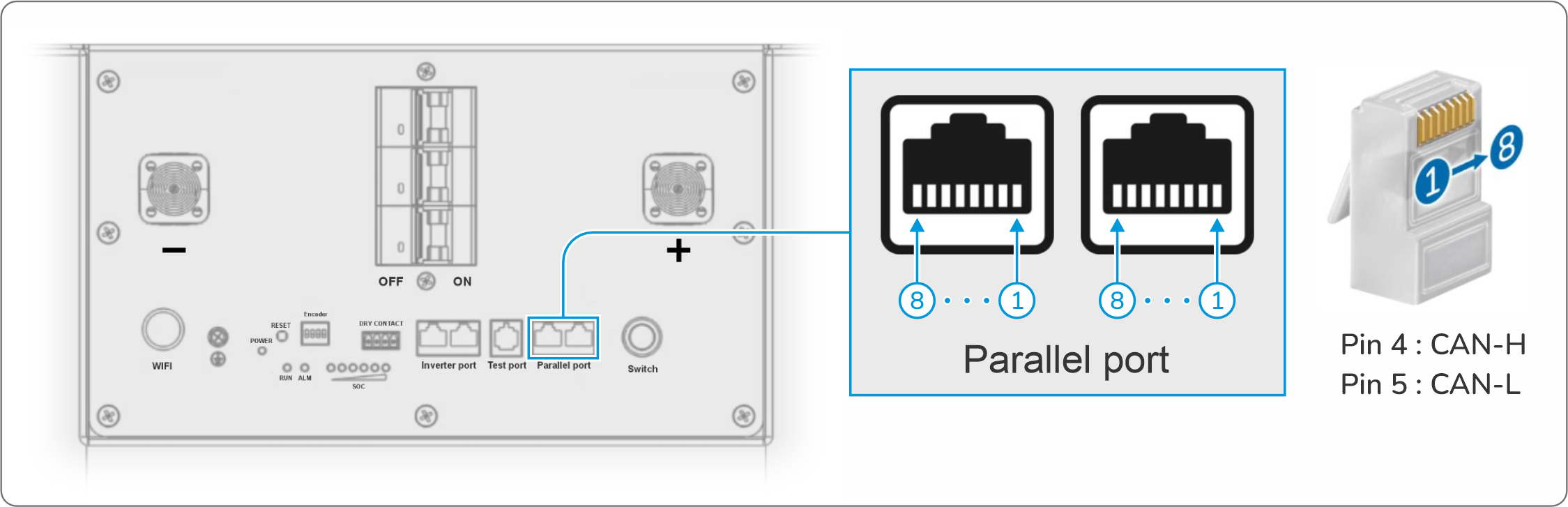
The 2 × RJ45 ports labelled “Parallel port” on each battery’s interface panel are used to interconnect the CAN serial communication of batteries included in a parallel battery configuration. The pin configuration is detailed below:
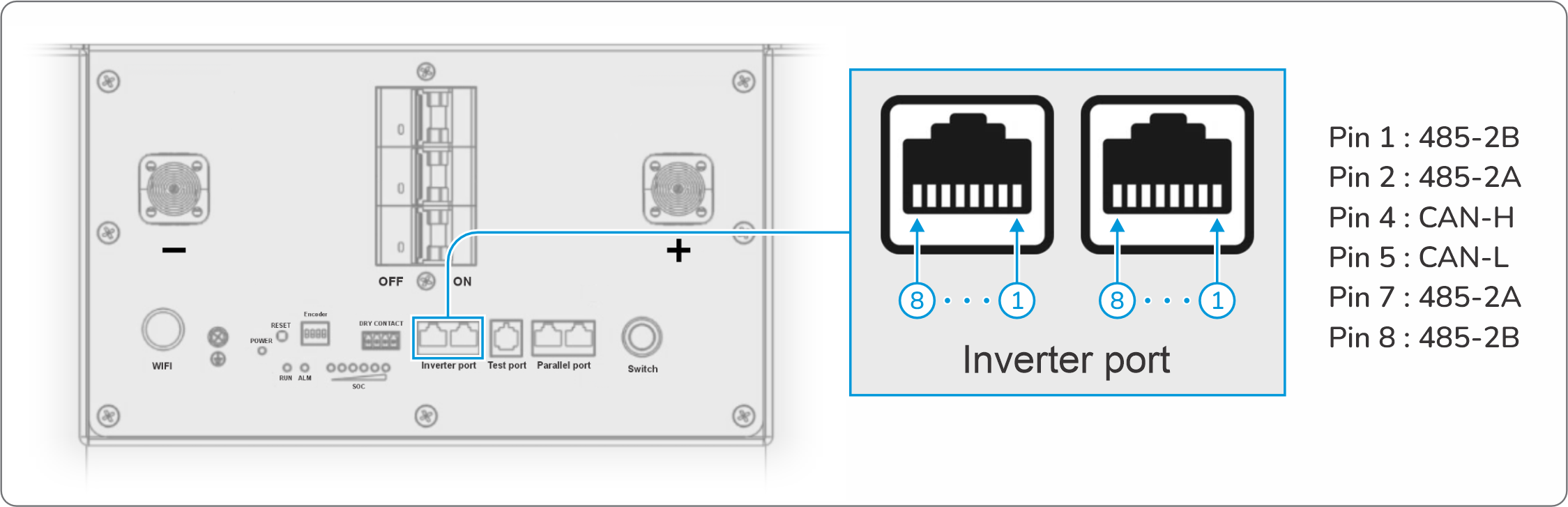
The 2 × RJ45 ports labelled “Inverter port” on each battery’s interface panel are used to connect the CAN / RS485 serial communication of batteries to a serial-compatible inverter. The pin configuration is detailed below:
ℹ️Apart from connecting SBB™ MKII Series batteries with correctly configured RJ45 communication cables to serial communication-compatible inverters, additional configuration is required via the integrated touch-screen display of any such batteries to establish communication. See section 6.2 for more information.
5.5 Voltage-based setup
For the purposes of installing SBB™ MKII Series batteries with voltage-compatible inverters that do not include serial communication, the following parameters must be set:
Specification | Value | Specification | Value | |
| Battery nominal voltage | 51.2V | Discharge cut-off voltage | 43.2V | |
| Bulk / float charge voltage | 57.6V | Temperature range (charge) | 0°C ~ 55°C | |
| Recommended charge current | 140A | Temperature range (discharge) | -20°C ~ 60°C | |
| Max. charge / discharge current | 150A | Temperature range (idle / stored) | 15°C ~ 35°C |
ℹ️Apart from physically connecting SBB™ MKII Series batteries with the correctly configured RJ45 communication cables to serial communication-compatible inverters, additional configuration is required via the integrated touch-screen display of such batteries to successfully establish serial communication. See section 6.2 for more information.
6. OPERATION
6.1 Indicators
The SOC LED array of each SBB™ MKII battery operates with the RUN & Alarm LED and integrated buzzer to indicate battery state-of-charge as follows:
Operational status | RUN LED | SoC LED array | State-of-charge | Alarm LED | Buzzer |
| Battery idle | 🟩 | 🟩🟩🟩🟩🟩🟩 | 84~100% SoC | 🔲 | 🔇 |
| 🟩 | 🟩🟩🟩🟩🟩🔲 | 66~83% SoC | 🔲 | 🔇 | |
| 🟩 | 🟩🟩🟩🟩🔲🔲 | 50~65% SoC | 🔲 | 🔇 | |
| 🟩 | 🟩🟩🟩🔲🔲🔲 | 33~49% SoC | 🔲 | 🔇 | |
| 🟩 | 🟩🟩🔲🔲🔲🔲 | 17~32% SoC | 🔲 | 🔇 | |
| 🟩 | 🟩🔲🔲🔲🔲🔲 | 0~16% SoC | 🆘 | 🔈 | |
Operational status | RUN LED | SoC LED array | State-of-charge | Alarm LED | Buzzer |
| Battery charging | 🟩 | 🟩🟩🟩🟩🟩🟩 | 100% SoC | 🔲 | 🔇 |
| 🟩 | 🟩🟩🟩🟩🟩✳️ | 83~99% SoC | 🔲 | 🔇 | |
| 🟩 | 🟩🟩🟩🟩✳️🔲 | 67~82% SoC | 🔲 | 🔇 | |
| 🟩 | 🟩🟩🟩✳️🔲🔲 | 51~66% SoC | 🔲 | 🔇 | |
| 🟩 | 🟩🟩✳️🔲🔲🔲 | 33~50% SoC | 🔲 | 🔇 | |
| 🟩 | 🟩✳️🔲🔲🔲🔲 | 17~32% SoC | 🔲 | 🔇 | |
| 🟩 | ✳️🔲🔲🔲🔲🔲 | 0~16% SoC | 🔲 | 🔇 | |
Operational status | RUN LED | SoC LED array | State-of-charge | Alarm LED | Buzzer |
| Battery discharging | ✳️ | 🟩🟩🟩🟩🟩🟩 | 84~100% SoC | 🔲 | 🔇 |
| ✳️ | 🟩🟩🟩🟩🟩🔲 | 66~83% SoC | 🔲 | 🔇 | |
| ✳️ | 🟩🟩🟩🟩🔲🔲 | 50~65% SoC | 🔲 | 🔇 | |
| ✳️ | 🟩🟩🟩🔲🔲🔲 | 33~49% SoC | 🔲 | 🔇 | |
| ✳️ | 🟩🟩🔲🔲🔲🔲 | 17~32% SoC | 🔲 | 🔇 | |
| ✳️ | 🟩🔲🔲🔲🔲🔲 | 8~16% SoC | 🔲 | 🔈 | |
| ✳️ | ✳️🔲🔲🔲🔲🔲 | 0~7% SoC | 🔲 | 🔉 |
ℹ️The icons in the above and below tables should be interpreted as follows:
| 🟩 = LED on | ❇️ = Flashing (once per second) | ✳️ = Flashing (once every 4 seconds) | 🔲 = LED off |
| 🟥 = LED on | 🆘 = Flashing (once per second) | 🔲 = LED off | |
| 🔊 = Buzzer on | 🔉 = Buzzing (once per second) | 🔈 = Buzzing (once every 4 seconds) | 🔇 = Buzzer off |
The LEDs, integrated buzzer and on-board display of SBB™ MKII batteries indicate specific warnings and/or fault conditions as described in the table below:
Display | RUN LED | SoC LED array | Alarm LED | Buzzer | Description of warning / fault |
| 04 | 🔲 | 🔲🔲🔲❇️🔲🔲 | 🟥 | 🔊 | Battery ID error |
| 18 | 🔲 | 🔲❇️🔲🔲❇️🔲 | 🟥 | 🔉 | Low temperature (discharge) |
| 20 | 🔲 | 🔲❇️🔲❇️🔲🔲 | 🟥 | 🔉 | Low temperature (charge) |
| 22 | 🔲 | 🔲❇️🔲❇️❇️🔲 | 🟥 | 🔊 | High / over-voltage |
| 24 | 🔲 | 🔲❇️❇️🔲🔲🔲 | 🟥 | 🔉 | Low / under-voltage |
| 26 | 🔲 | 🔲❇️❇️🔲❇️🔲 | 🟥 | 🔉 | High temperature (discharge) |
| 28 | 🔲 | 🔲❇️❇️❇️🔲🔲 | 🟥 | 🔊 | Discharge over-current |
| 30 | 🔲 | 🔲❇️❇️❇️❇️🔲 | 🟥 | 🔉 | High temperature (charge) |
| 32 | 🔲 | ❇️🔲🔲🔲🔲🔲 | 🟥 | 🔊 | Charge over-current |
| 34 | 🔲 | ❇️🔲🔲🔲❇️🔲 | 🟥 | 🔉 | MOS temperature too high |
| 36 | 🔲 | ❇️🔲🔲❇️🔲🔲 | 🟥 | 🔊 | Short-circuit connection |
| 38 | 🔲 | ❇️🔲🔲❇️❇️🔲 | 🟥 | 🔊 | Ambient temperature high |
| 40 | 🔲 | ❇️🔲❇️🔲🔲🔲 | 🟥 | 🔊 | Ambient temperature low |
6.2 Touch-screen display
The diagram below illustrates the image that should be displayed on the integrated touch-screen display of an SBB™ MKII Series battery upon switching the battery on:
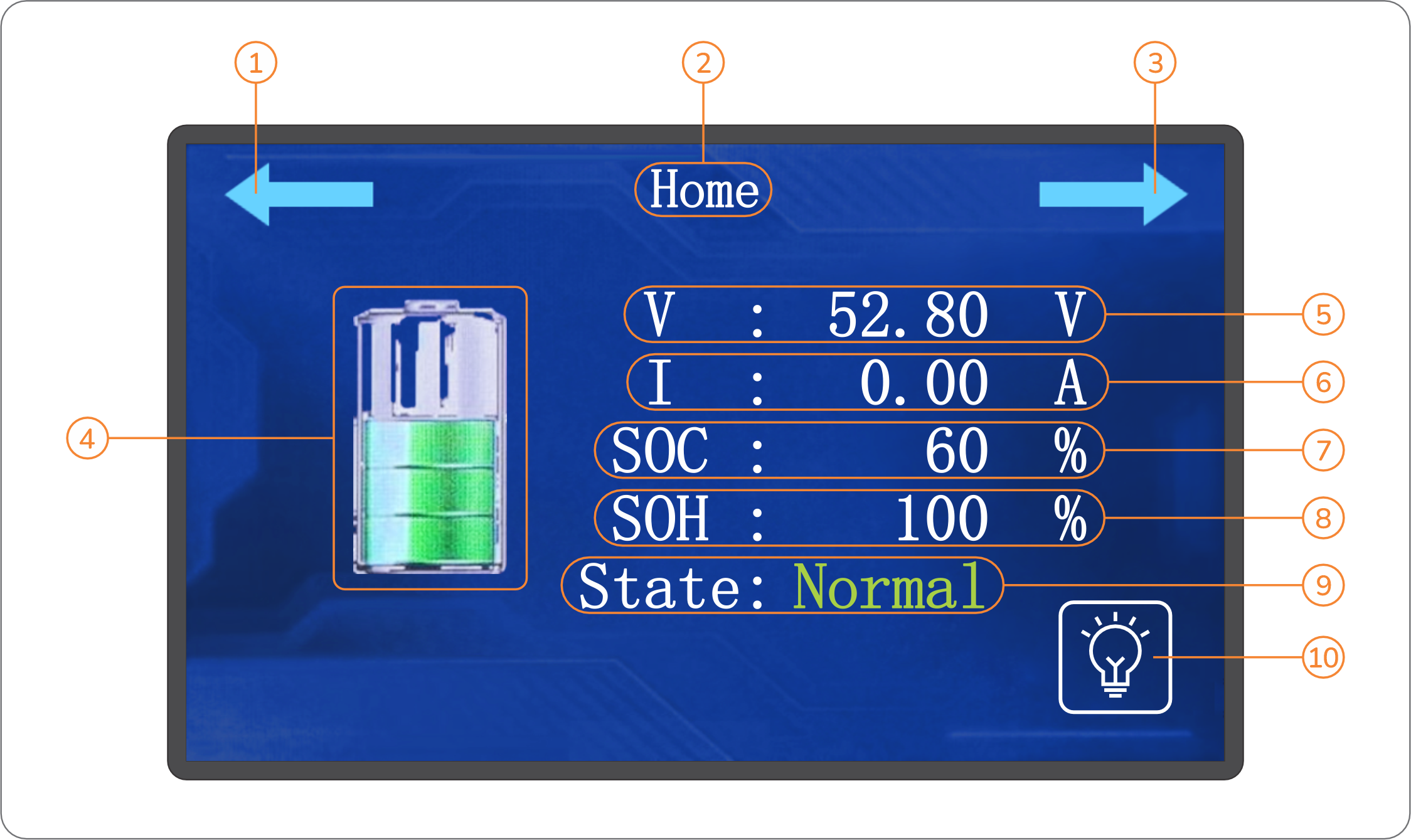
The numbered elements & sections in the diagram above are explained in the table below:
# | Designation | Type | Function / purpose |
| 1 | Previous page arrow | Button | Tap this arrow to navigate to the last page of the interface. |
| 2 | Page title | Text | Specifies the title of the specific page. |
| 3 | Next page arrow | Button | Tap this arrow to navigate to the next page of the interface. |
| 4 | State-of-charge | Graphic | Provides a visual indication of the current state-of-charge of the battery. |
| 5 | Voltage | Data | Specifies the measured voltage of the battery. |
| 6 | Current | Data | Specifies the measured current flowing into or out of the battery. |
| 7 | State-of-charge | Data | Provides a more accurate indication compared to the SoC graphic) of the current state-of-charge of the battery. |
| 8 | State-of-health | Data | Specifies the battery's state-of-health (percentage of the total available capacity in comparison to the battery's original capacity at 100%SoC). |
| 9 | State | Data | Specifies the overall operational status of the battery. |
| 10 | Backlight | Button | Tap this icon to switch the backlight of the display on or off. |
ℹ️The integrated touch-screen display of SBB™ MKII Series batteries will automatically switch off when idle for more than 60 seconds. To switch the display on again in such cases, simply touch / tap the display.
Tap on the Next page arrow (numbered 3 in the previous diagram) to navigate to the next page below. This page mainly provides a more detailed overview of the various factors that influence the performance of the battery:
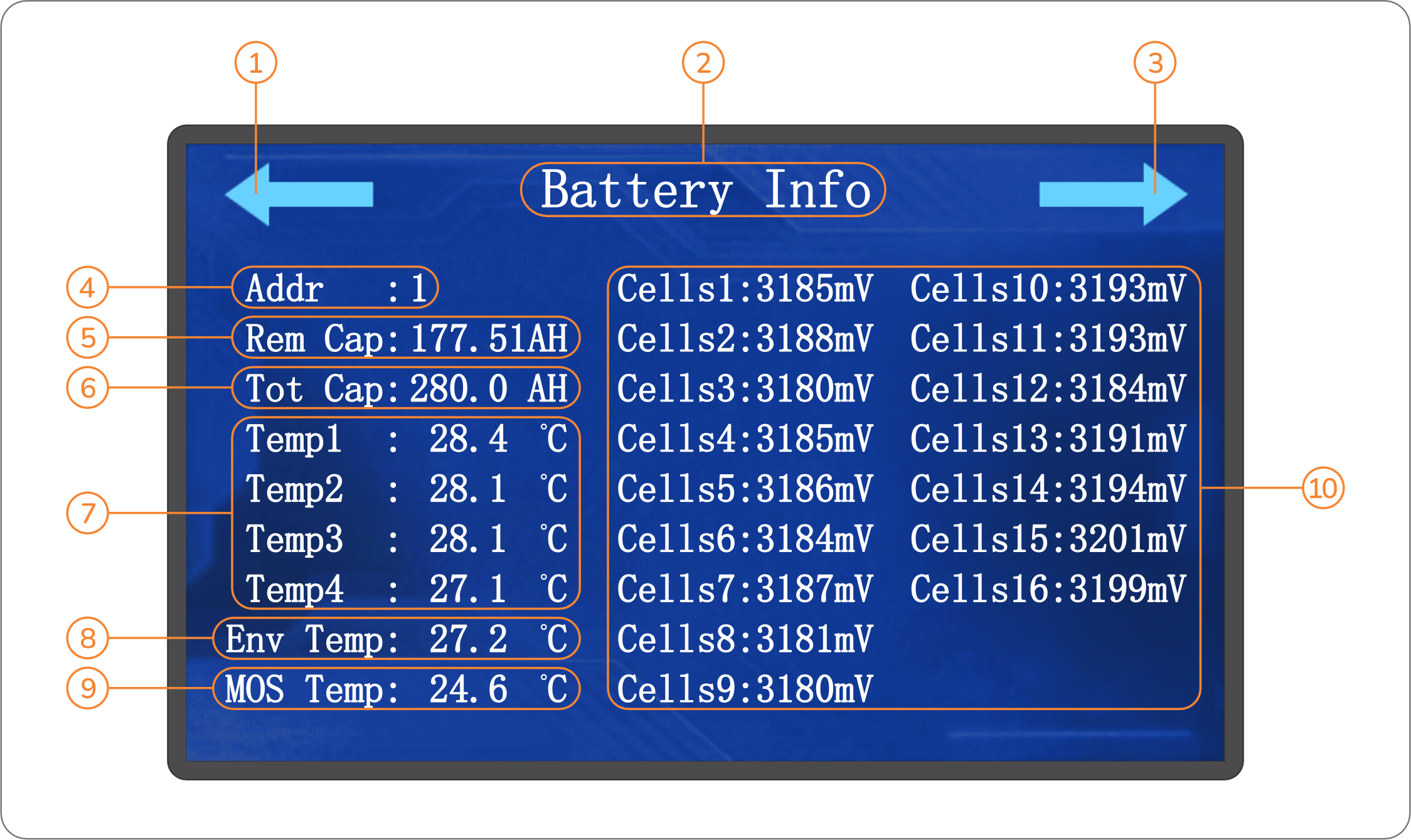
The numbered elements & sections in the diagram above are explained in the table below:
# | Designation | Function / purpose |
| 1 | Previous page arrow | Tap this arrow to navigate to the previous (main) page of the interface. |
| 2 | Page title | Specifies the title of the specific page. |
| 3 | Next page arrow | Tap this arrow to navigate to the next page of the interface. |
| 4 | Address | Specifies the address of the battery in a parallel configuration. For single batteries, this value will be 1. In parallel battery configurations, this value will be 1 for the master battery and increment for each additional battery connected in sequence. |
| 5 | Remaining capacity | Specifies the remaining Ampere-hour capacity of the battery (or the average cell capacity in the battery’s cell configuration) based on its current state-of-charge. |
| 6 | Total capacity | Specifies the original Ampere-hour capacity of the battery. |
| 7 | Internal temperatures | Specifies the 4 × internal temperature values measured in the battery’s enclosure. |
| 8 | Ambient temperature | Specifies the measured ambient temperature value. |
| 9 | Transistor temperature | Specifies the measured temperature of the battery's integrated transistor. |
| 10 | Cell voltages | Specifies the measured individual cell voltages of each of the battery's 16 x cells. |
⚠️Performance issues may arise in cases where the cell voltage difference between any 2 × cells in any single SBB™ MKII battery exceeds 10mV. In such instances the issue may be resolved via standard balance charge procedures. Should the issue persist, please contact BlueNova Technical Support for further assistance.
Tap on the Next page arrow (numbered 3 in the previous diagram) to navigate to the next page below. This page provides specific information on the various alarm & warning conditions that can be reported by SBBT™️ MKII batteries:
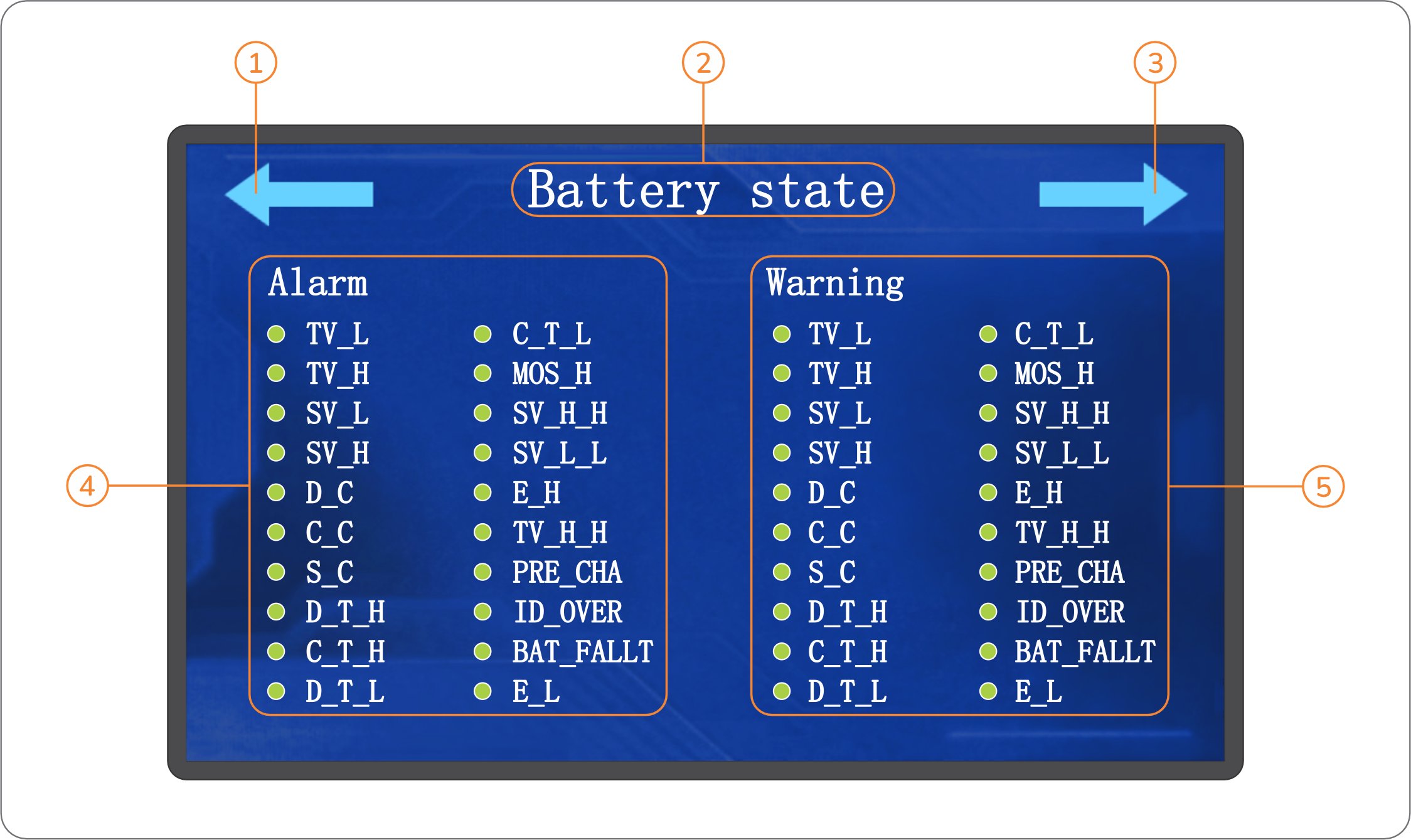
The numbered elements & sections in the diagram above are explained in the table below:
# | Designation | Function / purpose |
| 1 | Previous page arrow | Tap this arrow to navigate to the previous page of the interface. |
| 2 | Page title | Specifies the title of the specific page. |
| 3 | Next page arrow | Tap this arrow to navigate to the next page of the interface. |
| 4 | Alarm indicators | Specifies the 20 x alarm conditions that can be reported by the battery. |
| 5 | Warning indicators | Specifies the 20 x warning conditions that can be reported by the battery. |
Note: Green🟢bullets on the above page indicate normal status, while red🔴bullets indicate warnings & alarms. The text abbreviations for each condition on the above page are explained below:
Abbreviation | Description | Abbreviation | Description | |
| TV_L | Total (battery) voltage low. | C_T_L | Charge temperature low. | |
| TV_H | Total (battery) voltage high. | MOS_H | MOS transistor temperature high. | |
| SV_L | Single (cell) voltage low. | SV_H_H | Single (cell) voltage very high. | |
| SV_H | Single (cell) voltage high. | SV_L_L | Single (cell) voltage very low. | |
| D_C | Discharge current error. | E_H | Ambient temperature high. | |
| C_C | Charge current error. | TV_H_H | Total (battery) voltage very high. | |
| S_C | Short-circuit error. | PRE_CHA | Pre-charge error. | |
| D_T_H | Discharge temperature high. | ID_OVER | ID overtime error. | |
| C_T_H | Charge temperature high. | BAT_FALLT | Battery error. | |
| D_T_L | Discharge temperature low. | E_L | Ambient temperature low. |
Tap on the Next page arrow (numbered 3 in the previous diagram) to navigate to the next page below. This page specifies the existing serial communication protocol for which the battery has been configured (if any) and provides access to (re)configuring such protocols for successful integration with serial-compatible inverters:
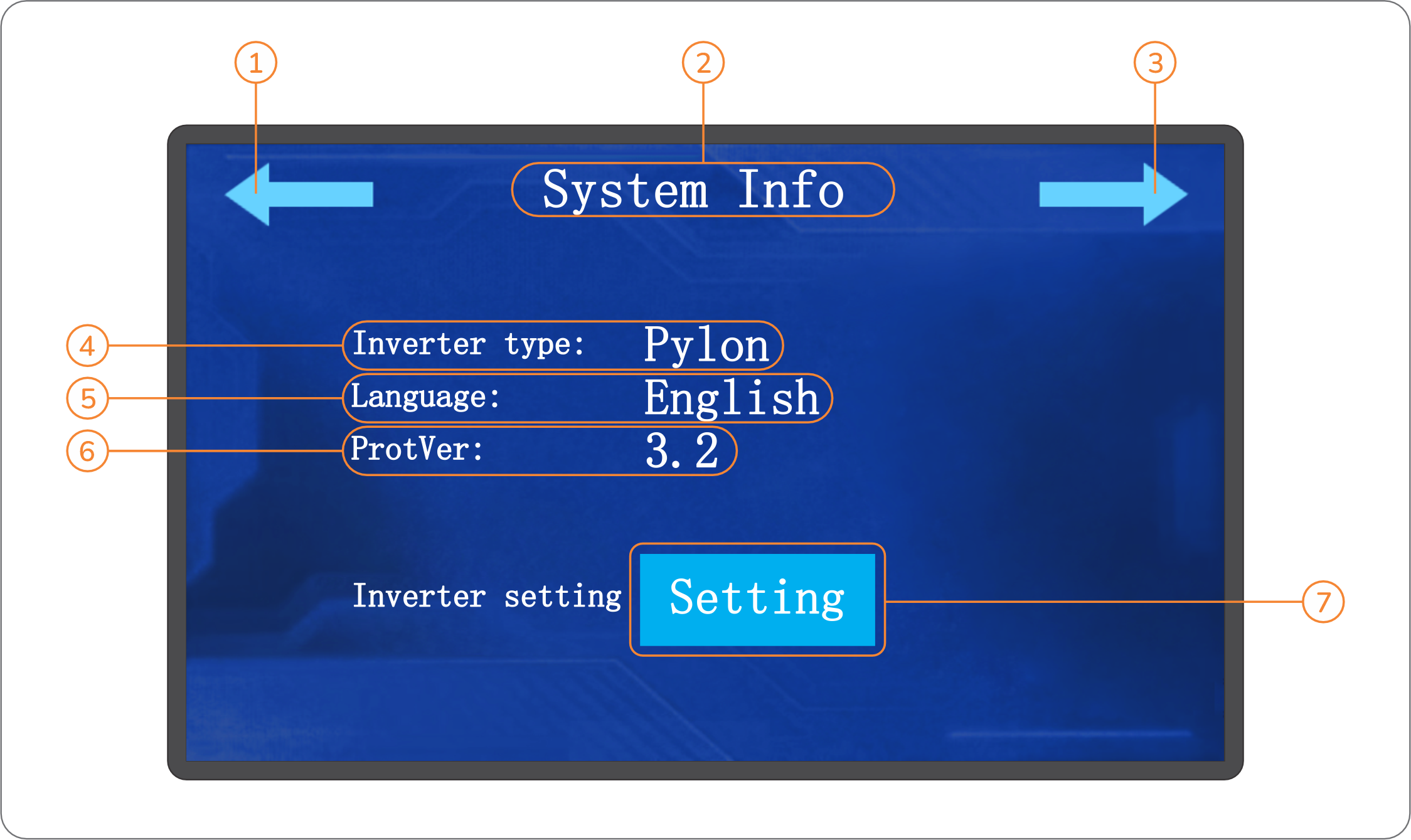
The numbered elements & sections in the diagram above are explained in the table below:
# | Designation | Function / purpose |
| 1 | Previous page arrow | Tap this arrow to navigate to the previous page of the interface. |
| 2 | Page title | Specifies the title of the specific page. |
| 3 | Next page arrow | Tap this arrow to navigate to the first (main) page of the interface. |
| 4 | Inverter type | Specifies the inverter-specific serial communication protocol with which the battery has been configured (if any). |
| 5 | Language | Specifies the selected language for displaying text in the interface. |
| 6 | Protocol version | Specifies the software / firmware version number of the serial communication protocol currently installed on the battery (if any). |
| 7 | Setting button | Tap this button to access the subpage from which the battery may be (re)configured for serial communication with a specific compatible inverter. |
ℹ️At the time of publication of this manual, SBB™ MKII Series batteries have been serial communication-compatible with specific 48V inverters manufactured by the following companies:

Tap on the Setting button (numbered 7 in the previous diagram) to navigate to the subpage below. This subpage specifies the inverter-specific serial communication protocol with which the battery has been configured (if any):
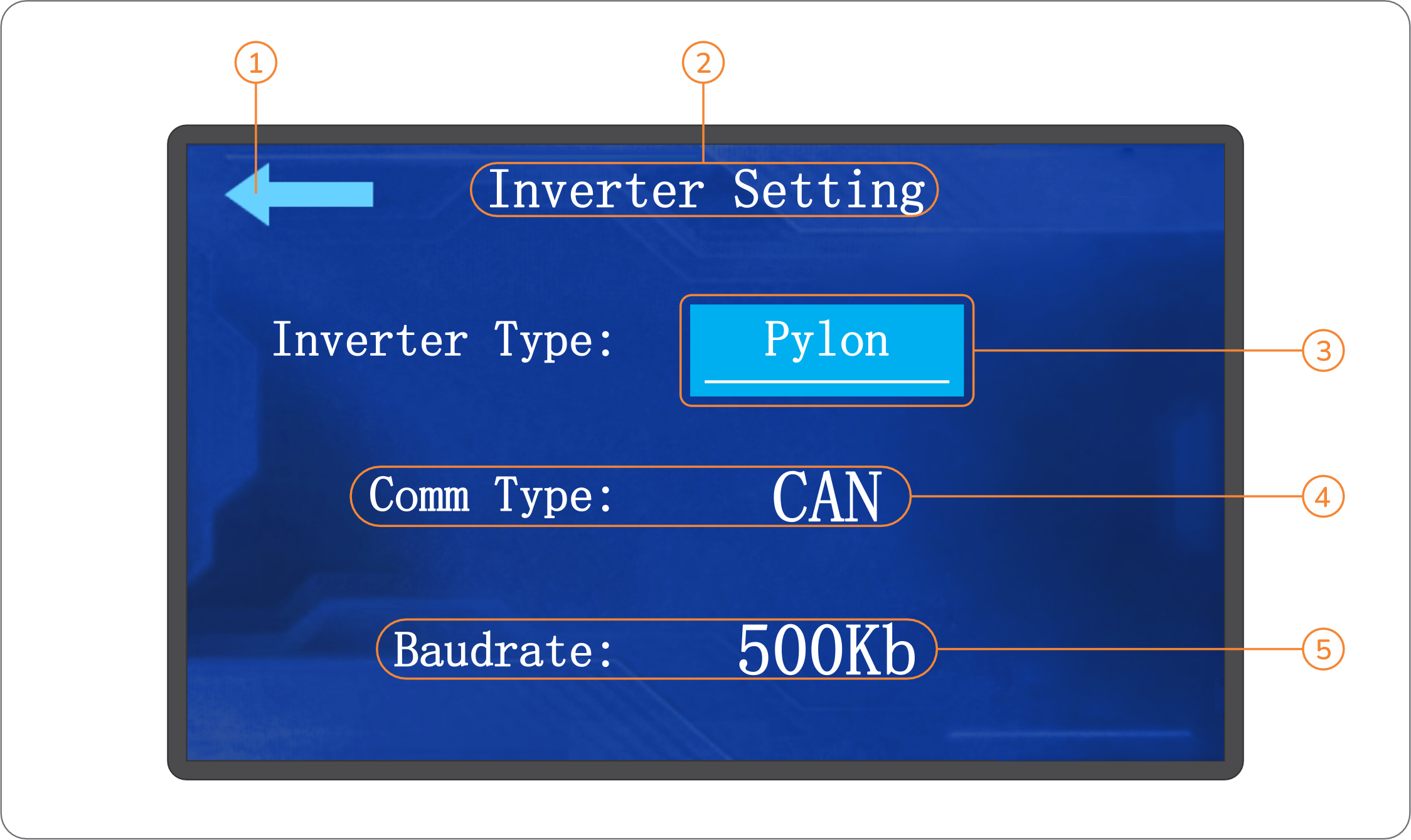
The numbered elements & sections in the diagram above are explained in the table below:
# | Designation | Function / purpose |
| 1 | Exit subpage arrow | Tap this arrow to exit the subpage and return to the previous main page. |
| 2 | Page title | Specifies the title of the specific page. |
| 3 | Inverter type (button) | The text on this button specifies the inverter-specific serial communication protocol with which the battery has been configured (if any). Tap this button to view a complete list of available inverter-specific protocols with which the battery may be (re)configured. |
| 4 | Communication type | Specifies the type of serial communication (CAN / RS485) associated with the inverter-specific protocol selected. |
| 5 | Baud rate | Specifies the associated BAUD rate at which serial communication data will be transferred between the battery and the inverter. |
Tap on the Inverter type button (numbered 3 in the previous diagram) to navigate to the subpage illustrated on the next page of this manual. This page lists all the inverter-specific serial communication protocols with which an SBB™ MKII Series battery may be configured:
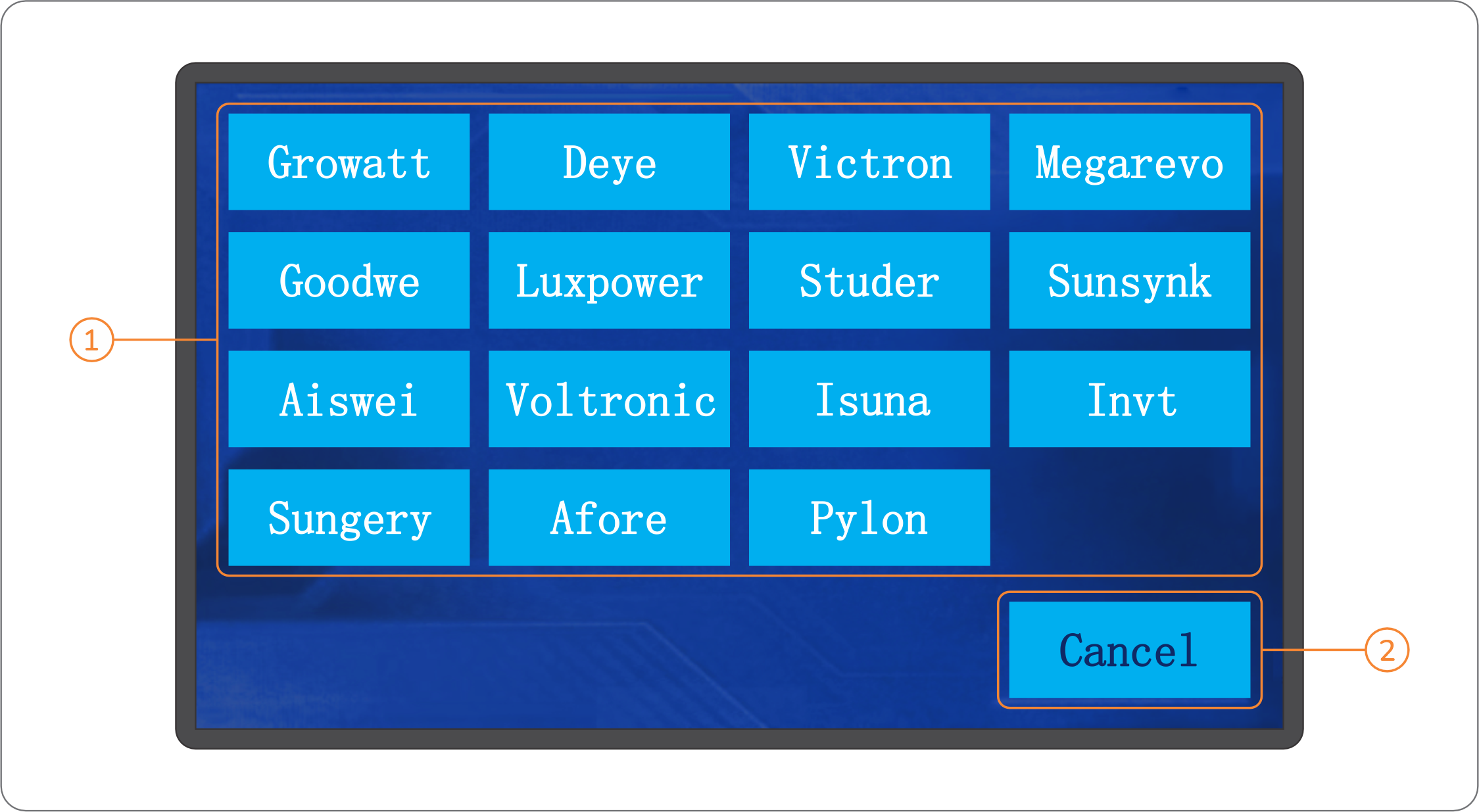
The numbered elements & sections in the diagram above are explaied in the table below:
# | Designation | Function / purpose |
| 1 | Inverter protocols | Select the appropriate option from this section (as determined by the inverter connected to the battery) to initiate setup. |
| 2 | Cancel button | Tap this button to cancel (re)configuration and return to the previous subpage. |
6.3 Remote monitoring
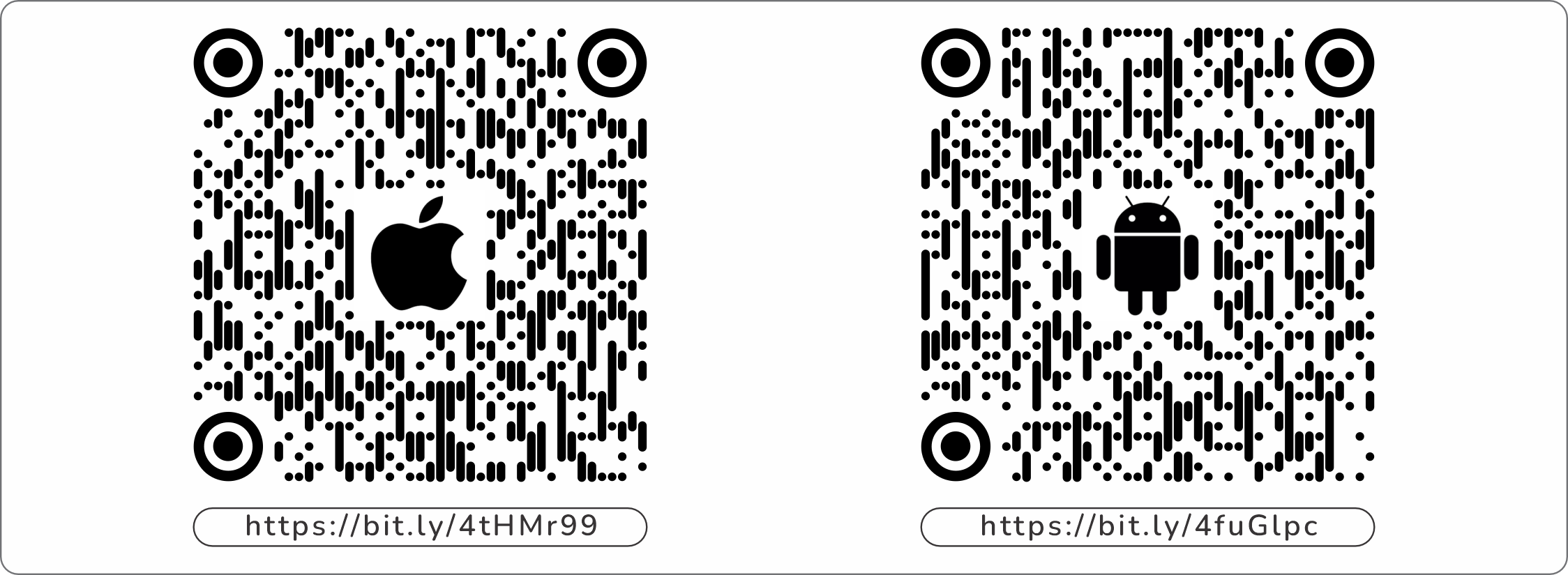
SBB™ MKII Series batteries can be remotely monitored via the IOE Green Energy mobile application. This application also allows SBB™ MKII Series batteries to be connected to an on-site Wi-Fi hotspot within range to enable remote monitoring from any internet-connected smart device. To download the application, scan the applicable QR code below:
7. EMERGENCY & FIRST AID
The table below lists some emergency conditions which may be encountered in the proximity of SBB™ MKII Series batteries, and the corresponding procedure(s) to follow in each case.
⚠️Some of the procedures listed below require specific PPE. Do not proceed with any such procedure without wearing the correct associated PPE required in each case.
Emergency condition | Procedure to follow |
| 7.1 Ruptured / leaking components |
|
| 7.2 Fire / thermal events |
|
| 7.3 Water ingress |
|
| 7.4 General damage |
|